What xM-Draw is
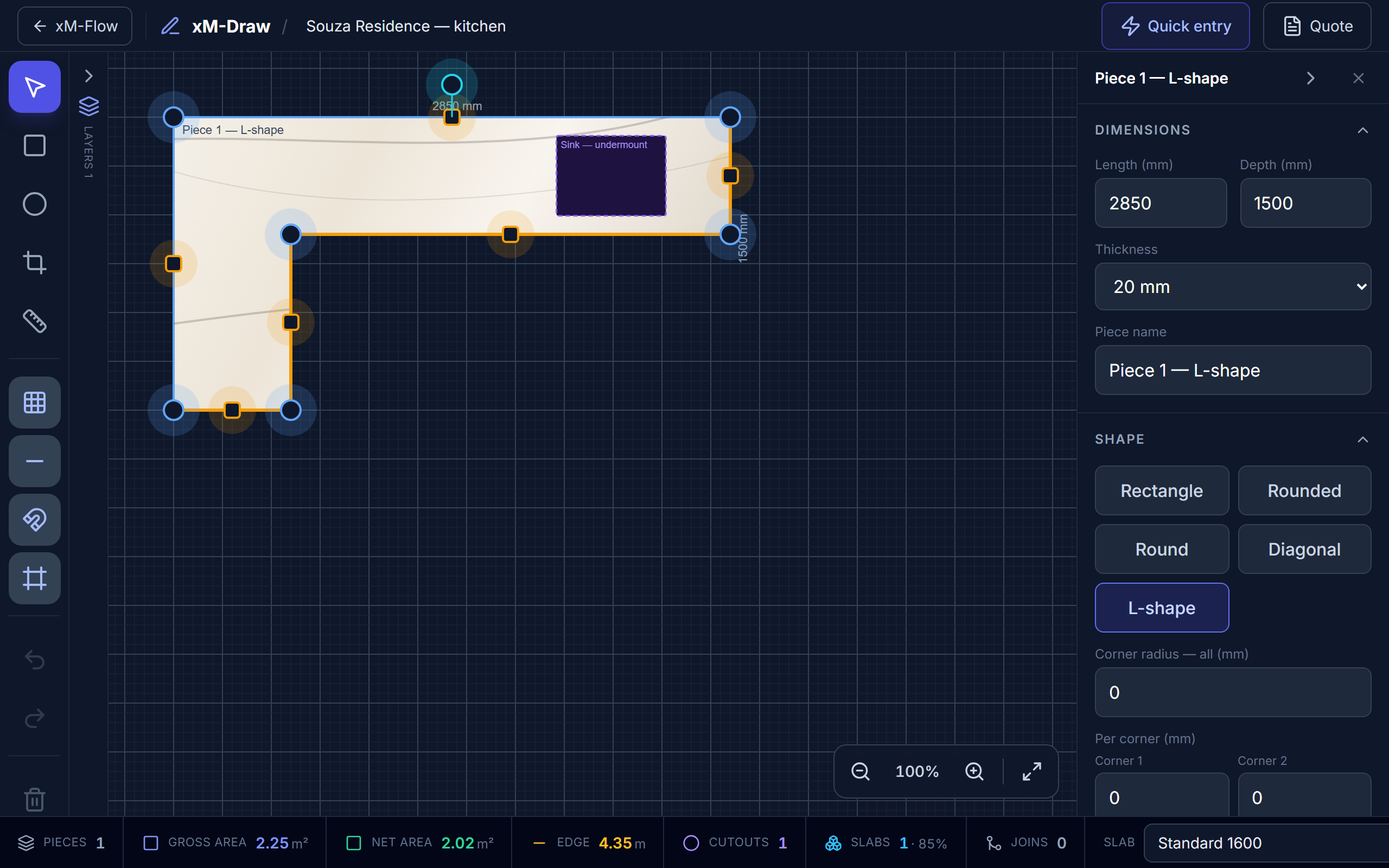
xM-Draw is the drawing and quoting app in the xM-Flow suite. You draw stone benchtops and countertops in 3D, lay them on the actual slab, and the drawing calculates area, edges and cutouts, prices the job and exports a DXF for your CNC. The finished quote goes straight into xM-Flow, so nothing is re-typed.
The usual path from a customer's kitchen to a cut top runs through several hands: a rough sketch, a measurement sheet, a pricing spreadsheet, a CAD drawing for the machine and a quote typed into the job system. Each hand-off is a chance to lose a dimension, mis-price an edge or cut the wrong slab. xM-Draw replaces that chain with one drawing that does all of it.
What you can do with it
Draw in 3D, with the customer
xM-Draw runs on a tablet, so the drawing happens across the showroom table or in the customer's kitchen, not back at the office a day later. Pieces, joins, edge profiles and cutouts for sinks, cooktops and taps are part of the drawing, and the customer watches their benchtop take shape.
On the real slab, veins and all
xM-Draw lays the benchtop over the actual slab and offcuts captured in xM-Slab. You can match veins across pieces so a waterfall or a join reads as one continuous stone, and the customer sees exactly where the veining will fall before anything is cut. That's what kills the "that's not the stone I picked" remake.
Nest on slabs and offcuts, see the yield first
Fit the pieces onto real slabs and remnants from inventory and see the yield before a single cut. A small vanity can come out of an offcut you already own instead of a fresh slab.
The drawing prices itself
Area, edge lengths by profile and cutouts come straight from the drawing and are priced from your rates. Pricing reflects the material in stock. There's no separate step where someone re-measures a sketch and types numbers into a spreadsheet.
Machining cost, at the point of sale
Alongside the sell price, xM-Draw estimates what the job will cost to fabricate. It works out straight cuts on the saw, shaped cuts and cutouts on the CNC, edge polishing time by profile, handling, joins, and the stone lost to kerf on every cut, then values them at your machine and labour rates. The factory sees cost against margin before the quote is sent, not after the job is cut.
DXF export for CNC and CAM
When the job is confirmed, export a machine-ready DXF in millimetres for your CNC or CAM software. The same drawing that sold the job goes to the machine, so the dimensions the customer approved are the dimensions that get cut. More on this on the CNC and DXF page.
Pushed straight into xM-Flow
The priced quote lands in xM-Flow attached to the customer. When it's accepted, xM-Flow creates the job, its pieces, the slab reservation and the schedule in one move, and the floor sees it the moment it's won.
Before and after xM-Draw
| Step | Typical way | With xM-Draw |
|---|---|---|
| Sketch | Paper, photographed or redrawn later | 3D on a tablet, with the customer |
| Stone | Catalogue photo or a sample | The actual slab, veins matched |
| Price | Re-measured into a spreadsheet | Calculated from the drawing and your rates |
| Cost and margin | Known after the job, if ever | Machining and material cost before sending |
| Machine file | Redrawn in CAD | DXF export from the same drawing |
| Job | Typed into the job system | Created in xM-Flow when accepted |
Who uses it
- Showroom and sales staff who want to close while the customer is still at the table.
- Templaters and estimators who measure on site and want the quote ready before they leave.
- Production managers who want the file the machine cuts to match the drawing the customer signed.
- Owners who want to see the cost and margin on every quote, not just the sell price.
A typical showroom session
Here's how a sale tends to run with xM-Draw on the table, from the customer sitting down to a quote they can sign:
- Start from their plan or measurements. Rough dimensions from the customer, the cabinet maker or the templater are enough to begin.
- Draw the tops together. Island, back bench, splashbacks. Add the sink, cooktop and tap holes where they'll actually go, and pick an edge profile for each run.
- Choose the stone on the rack. Pick a real slab captured in xM-Slab rather than a catalogue swatch, and lay the pieces on it.
- Move the veins until they like it. Shift and rotate pieces so the pattern runs where the customer wants it and the joins fall somewhere sensible.
- Check yield and cost. See how the pieces nest on the slab and any offcuts, what it costs to machine and what margin the price leaves.
- Send the quote. The priced quote goes into xM-Flow against the customer, ready to sign online.
The customer leaves having seen their benchtop on their stone, and the shop leaves knowing what the job makes. If anything changes later, you change the drawing, and the price, cost and DXF update with it instead of being edited in three places.
How to get xM-Draw
xM-Draw is included on the xM-Flow Pro and Pro+ plans. You can try it free first at app.xm-flow.com/draw-trial. Plans are on the pricing section. It works best alongside xM-Slab, which supplies the real slab photos, and the rest of xM-Flow, which turns the accepted quote into a job.
Frequently asked questions
What is xM-Draw?
xM-Draw is the 3D drawing and quoting app in the xM-Flow suite. You draw stone benchtops and countertops, lay them on the real slab, and the drawing calculates and prices the job, estimates machining cost and exports a DXF for CNC.
Does xM-Draw export files for CNC machines?
Yes. xM-Draw exports a machine-ready DXF in millimetres for your CNC or CAM software.
Can the customer see their benchtop on the actual slab?
Yes. xM-Draw lays the drawing over the real slab and offcuts captured in xM-Slab, and you can match veins across pieces.
What does the machining cost estimate include?
Straight cuts on the saw, shaped cuts and cutouts on the CNC, edge polishing by profile, handling, joins and the stone lost to kerf, valued at your machine and labour rates.
Do I need xM-Flow to use xM-Draw?
xM-Draw is part of the xM-Flow suite and pushes its quotes into xM-Flow. It is included on the Pro and Pro+ plans, and there is a free trial at app.xm-flow.com/draw-trial.