Where a stone shop actually loses time
Nothing in a fabrication shop is slow because people are slow. It's slow because the job lives in five places at once and none of them talk.
Walk the floor of most stone shops and you'll find the same pattern: a whiteboard with this week's jobs, a production manager who knows which piece is on which machine, operators asking the office whether a job is good to cut, installers ringing to check that the top is actually polished, and a remake that nobody costed. The work gets done, because good people make it happen. The cost shows up as phone calls, waiting, re-cuts and margin nobody can see.
Stone shop management software exists to take that coordination off people's heads and put it somewhere everyone can see.
One production board, every stage
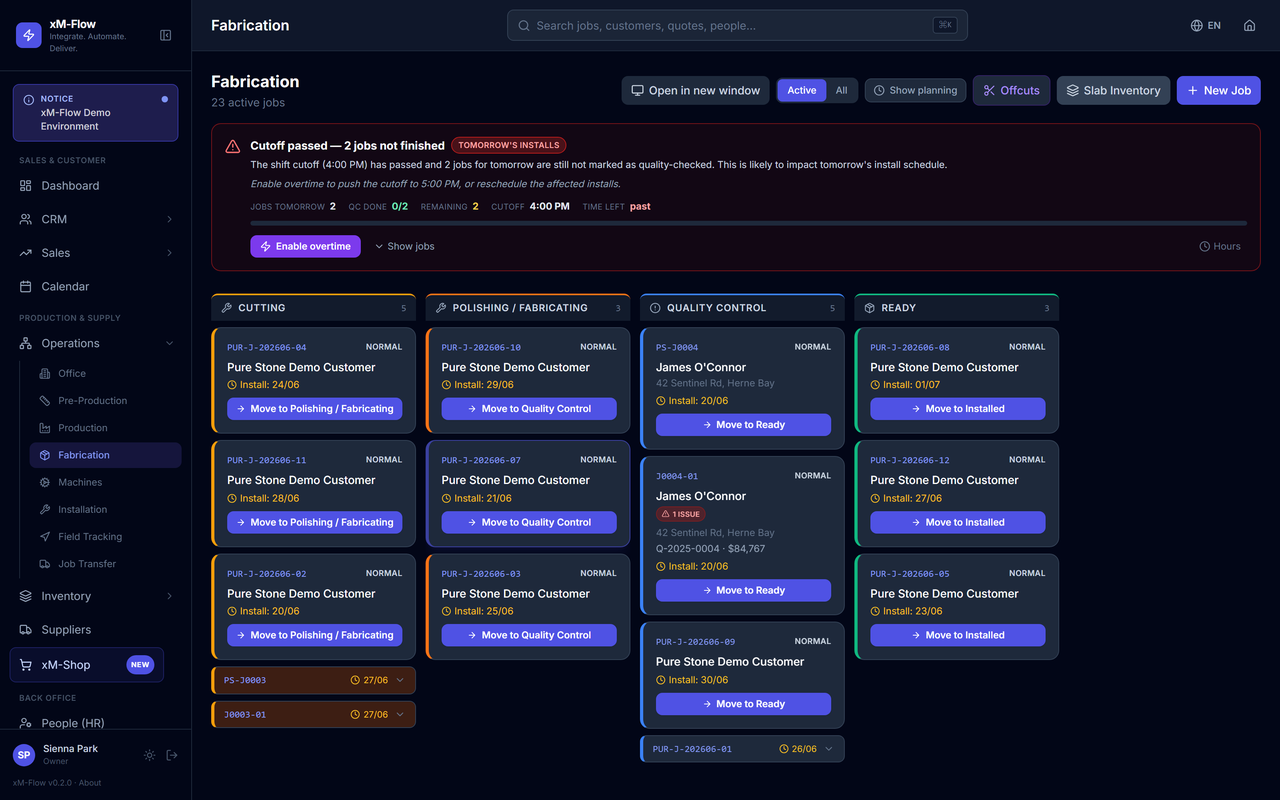
In xM-Flow, every job moves through cut, polish and QC on a single production board. When a quote is accepted, the job, its pieces, the slab reservation and the schedule are created in one move, so the floor sees the job the moment it's won. Nobody re-types it, and nobody walks to the office to ask where it's at.
Machines and people, assigned by qualification
Register your bridge saws, CNC machines and waterjets, and the production manager assigns work to them. Each stage gets an operator and a machine, matched by qualification, so the job that needs a mitred edge goes to someone who can do it. Every machine carries its own profit and loss, which makes the "do we need another saw?" conversation about numbers rather than gut feel.
Phone-first at the machine
Operators work from a phone at the station rather than a PC in the office. The field and floor apps are offline-first, with biometrics, geofencing and push notifications, so a weak signal at the back of the yard doesn't stop the job.
A cutoff monitor that warns before it's late
Production cutoffs, SLA alerts and manager briefings fire on their own. If a job won't make its install date at the current pace, you find out while there's still time to move it, not when the installer is standing in an empty kitchen.
QC and remakes without the black hole
Every shop breaks pieces. What separates a profitable shop is what happens next. In xM-Flow, a remake is recorded against the job, the cost lands on that job, and the system looks for a matching offcut before anyone opens a new slab. Remakes on rare material escalate to the owner automatically. Over time you can see which stages, materials or machines cause the most remakes. That's where to fix the process. See slab and offcut inventory.
Templating and installs, tied to the job
Templating with GPS check-in
Templaters check in on site with a geofenced GPS check-in, follow a route across the day, and their measurements flow straight into the job and the quote. No more re-keying from paper, and the office can see which sites have been measured.
Installation scheduling against real capacity
Tomorrow's installs are checked against QC status and crew capacity before they're confirmed. Installer pairs see their jobs on their phones, check in on arrival, and the customer can follow the install date in their portal instead of ringing the office.
Will today hit target?
Most stone factories run on a daily target, whether that's jobs out the door, square metres or dollars. xM-Flow reads the day's jobs and the value of each, projects whether the floor will hit the target, and if it's falling short shows the change that would get it there. Here's an illustrative example of what that looks like:
Example: Target 8 jobs worth $14,400. At the current pace, the floor is projected to finish 6 jobs, about $10,800, which is $3,600 short. Suggested change: pull one job forward and run two polish jobs into overtime, projecting all 8 jobs.
Alex, the built-in AI agent, makes suggestions like that. The production manager decides.
Approvals that carry context
A lot of shop management is decisions: a large purchase order, a discount, a remake on an expensive stone, a machine breakdown. In xM-Flow, each approval card shows the budget, the price history and the job margin before anyone decides. Approvals route by data: large POs and rare-material remakes go to the owner, and a critical-machine breakdown jumps the queue. Approving books it. Rejecting captures why.
More than one site
For groups running several factories, Pro+ adds a head-office dashboard that shows every branch in real time, job transfers between sites with costs settled, cross-branch finance and unlimited users.
A shop-floor checklist for any system you trial
- Does the floor see a job the moment it's sold, without anyone re-typing it?
- Can an operator update a stage from a phone at the machine?
- Are machines first-class, with work assigned and returns tracked?
- Does a remake land on the job, and does it check offcuts first?
- Will it warn you before an install date is missed, or after?
- Can installers and templaters check in on site with GPS?
- Can you see today's production against target before the day is over?
Frequently asked questions
What is stone shop management software?
Software that runs the operational side of a stone fabrication shop: the production board, machines and operators, QC and remakes, templating and installation scheduling, approvals and daily targets, all on one live record per job.
Can operators use it on the shop floor?
Yes. Operators work phone-first at the machine. The field and floor apps are offline-first, with biometrics, geofencing and push notifications.
How does it handle remakes?
A remake is recorded against the job and its cost lands on that job. The system looks for a matching offcut first, and remakes on rare material escalate to the owner.
Does it schedule installation crews?
Yes. Installs are checked against QC status and crew capacity, installers check in on site with GPS, and customers can follow the install date in their portal.
Can it manage several factories?
Yes. Pro+ adds a head-office dashboard across branches, job transfers between sites with costs settled, cross-branch finance and unlimited users.