Each module below reads and writes the same job. That's the point: a measurement taken on site, a slab reserved in the yard and an hour logged at the saw all end up on the same record, so the margin you see is the real one. It works the same whether you call them benchtops or countertops.
Jump to: CRM and sales pipeline · Quoting and estimating · Templating with GPS check-in · Slab and offcut inventory · Production and the shop floor · Installation scheduling · Finance, job costing and margin · Alex, the AI agent · Multi-branch operations · Integrations · Security and access control · The companion apps
CRM and sales pipeline
Every enquiry, whether it comes from a homeowner, a joinery, a builder or an architect, lands in one pipeline with its full history. The CRM doesn't just list leads. It ranks them: stage, recency and account value score every open lead automatically, so the hottest ones rise to the top.
It also surfaces what's slipping. Overdue follow-ups, quotes stalled in a stage, thin margins, dormant trade accounts and reorders due all show up as next actions. These are worked out from rules over your own operational data, not guesswork. Every job is traced back to the trade partner who sent it, so you know which relationships actually bring in revenue.
Quoting and estimating
Quotes are priced from live material, labour and machine rates that you control, so they don't drift the way a spreadsheet does. A quote can carry a win probability before it goes out, and follow-ups run automatically after it's sent. Discounts route for approval before they eat the margin.
On Pro, xM-Draw lets you draw the benchtop in 3D with the customer, lay it over the real slab and price it as you draw. Accepting the quote creates the job, its pieces, the slab reservation and the schedule in one move. Read more about stone quoting software.
Templating with GPS check-in
Templaters get their own mobile interface. They see the day's route, check in on site with geofenced GPS, and take measurements that flow straight into the job and the quote instead of being re-keyed from paper back at the office.
The office knows when the templater is on site without making a call, and the measurement is attached to the job everyone else is already looking at. That's one fewer re-type between the customer's kitchen and the saw, and one fewer place for a number to go wrong. More on running the field side in stone shop management.
Slab and offcut inventory
Full slabs and reusable offcuts are tracked as records, not guesses. You can see what's on the rack, reserve the slab the customer chose against their job, and check reserved slabs when they arrive. Offcuts aren't treated as scrap. They feed the remake match and xM-Draw nesting, so the stone you've already paid for gets used first.
When a piece breaks, the system looks for a matching offcut before anyone cuts into a new slab. Low stock on a confirmed job can raise a purchase order for approval. See slab inventory software and xM-Slab.
Production and the shop floor
The production board shows every job through cut, polish and QC in one view. Operators and machines are assigned per stage, by qualification, and operators work phone-first at the machine. Nobody has to walk to the office to find out where a job is.
Predictive operations sit on top of the board. Set a daily target and the system reads the day's jobs and their value, projects whether you'll hit it, and if you're short it shows the workload change that gets you there. Tomorrow's installs are checked against QC and shift capacity, and cutoff alerts fire on their own. Register your bridge saws, CNC machines and waterjets so work can be assigned to them. See stone shop management and CNC and DXF.
Installation scheduling
Installs are scheduled against the real state of production, so a job only goes on the calendar when its pieces have passed QC. Crews see their day on a native mobile interface with geofenced check-in, and the office sees them arrive on site without ringing anyone.
Customers can follow their install date in the customer portal, which cuts down the "when are you coming?" calls. Because the install is part of the same job record, the install crew's time and travel land on that job's cost, which is where most shops lose sight of their margin.
Finance, job costing and margin
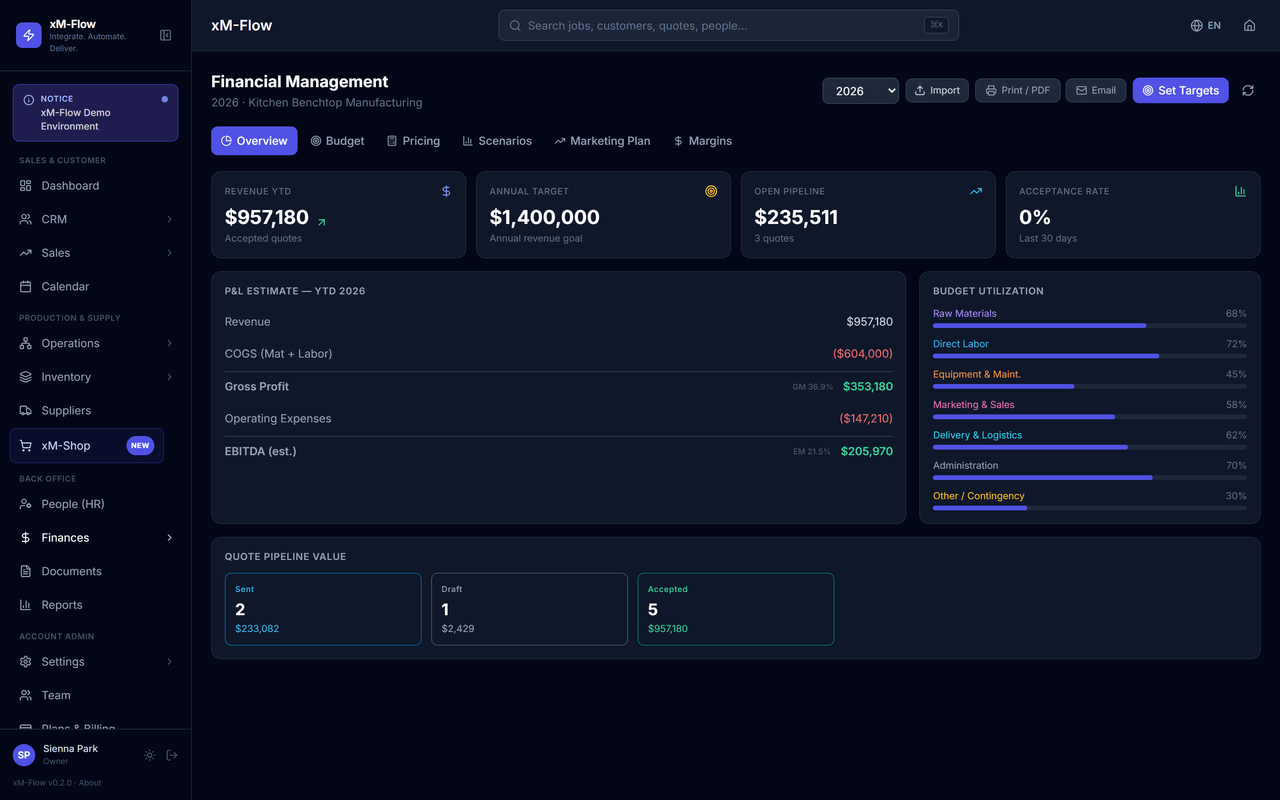
xM-Flow costs jobs with activity-based costing built into the engine. Stone, labour, machine time, freight and overhead are allocated to the job that caused them as they happen, so you see the margin at day three, not day thirty. The same engine powers estimates, quotes and the profitability X-ray, so there's one source of cost truth.
Receivables carry collection tracking, payables feed cost per job, and AI forecasts look ahead at cash flow. Every machine carries its own profit and loss, and on Pro you get full analytics, equipment ROI and benchmarking against anonymised peers across the network.
Alex, the AI agent
Alex is built into the system, not bolted on. Ask it to open a job, draft a quote, find a Calacatta offcut and reserve it, or tell you which jobs are at risk this week, and it does it inside the app, within the permissions of the person asking.
On Pro and Pro+, Alex adds Business Advisor mode: it scopes decisions, spots margin drift and cash-flow timing, and pushes back honestly. It's clear that its analysis is a suggestion, not the last word. Smart approvals put budget, price history and job margin on the approval card and route the big calls, like large purchase orders or rare-material remakes, to the owner. Meet Alex.
Multi-branch operations
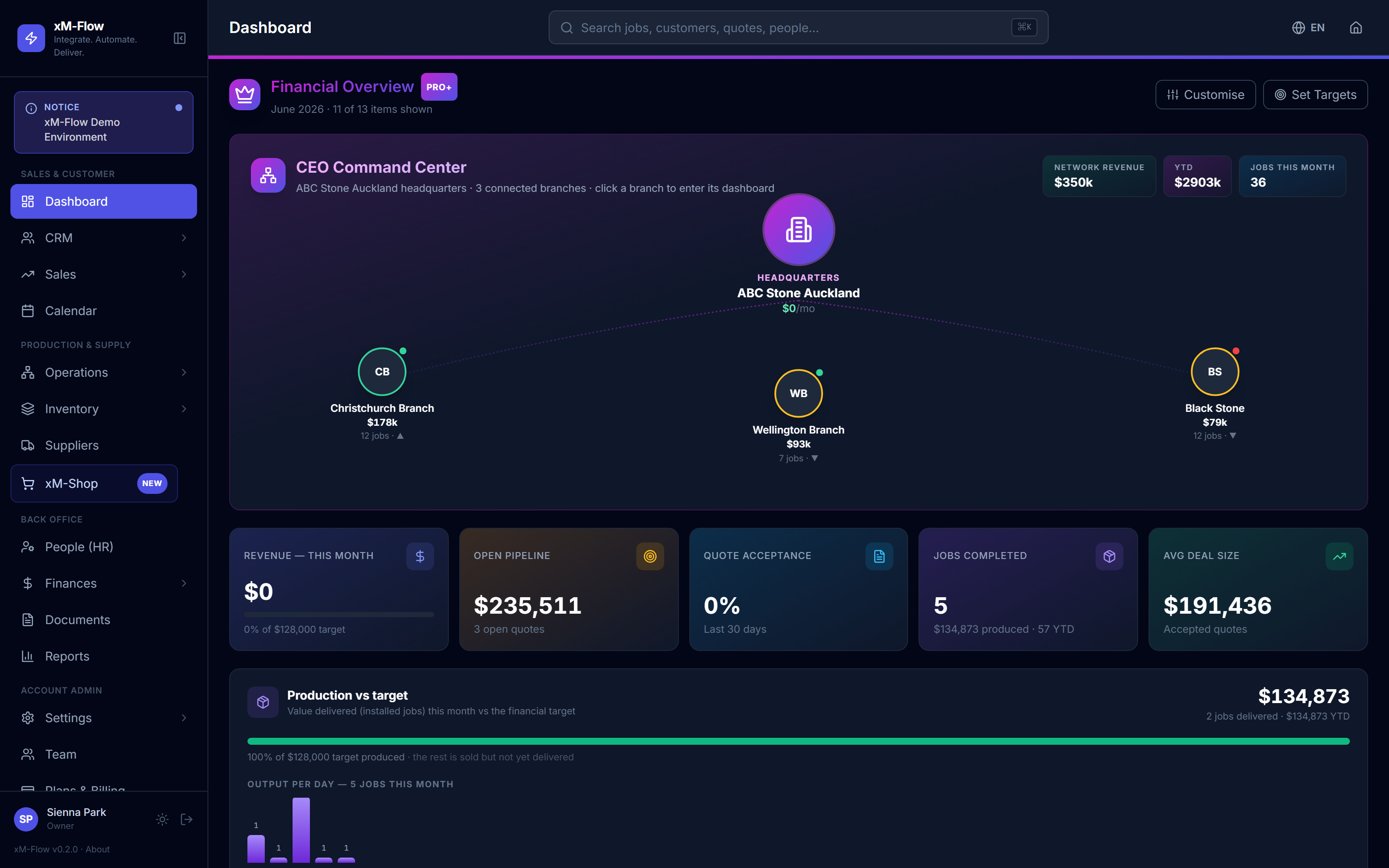
Groups running more than one site use Pro+. From head office, the owner sees every branch on one live dashboard, the CEO Command Center: revenue, quote win rate, pipeline and production by branch.
Jobs can move between sites with the costs settled between branches, finance rolls up across the group, and there's cross-branch chat and unlimited users. Each branch still runs its own floor, rack and install calendar in the same system, so a busy site can hand work to a quieter one without a spreadsheet in between.
Integrations
xM-Flow is designed to sit alongside the tools you already trust rather than replace all of them at once. It connects to Xero and MYOB, so jobs, invoices and costs flow into the accounts you already keep. Stripe handles payments and WhatsApp brings customer conversations into the job instead of leaving them on someone's phone.
Documents such as supplier invoices and packing slips can be read and classified by AI and attached to the right record. Because modules can be switched on one at a time, you can start with quoting or the floor and bring the rest across as the team adapts.
Security and access control
Each workspace is an isolated tenant. Role-based access control decides who can see and change what, from the owner down to an operator at the saw, and two-factor authentication protects sign-in. Rate limiting and defences against AI prompt injection are always on, and a full audit trail records who did what.
Alex works inside those same permissions: it can only take actions the signed-in user is allowed to take. You own your data and can export it while your subscription is active. See the terms and privacy policy for the detail.
The companion apps
Around the xM-Flow core sit four companion apps. They all read and write the same job:
- xM-Draw: draw the benchtop in real 3D with the customer, match veins across pieces and export a machine-ready DXF. Included on Pro.
- xM-Slab: photograph a slab, straighten it, and show the customer their top on the actual stone. Runs on its own, or is included on Pro.
- xM-Trade: the verified trade network, ranked on work actually delivered. Free to join.
- xM-Shop: order stone and consumables without leaving the job. Low stock raises the purchase order, you approve, and the cost lands back on the job.
The field side runs on native mobile interfaces for templaters, installers and daily operations. They're offline-first, with biometrics, geofencing and push notifications, and sync when the connection comes back.