What is stone fabrication software?
Stone fabrication software is a business system built for shops that cut and install natural and engineered stone benchtops and countertops. It manages each job from enquiry and quote through templating, slab allocation, cutting, polishing, installation and invoicing, so that material, labour and machine costs land on the job and the shop can see its real margin.
The difference from a generic job tracker is the material. A stone shop buys slabs of roughly 3200 × 1600 mm in 12, 20 and 30 mm thicknesses, cuts irregular pieces out of them, keeps the offcuts, and has to get the veins, edges and cutouts right first time. Software that doesn't understand slabs, yield, offcuts and remakes can record a job, but it can't tell you what the job made.
Most shops arrive at this kind of software after outgrowing a mix of spreadsheets for pricing, a whiteboard for the floor, a shared calendar for installs, WhatsApp groups for everything in between and an accounting package that only sees the invoice. Each tool works. The problem is the gaps between them.
What it has to cover, stage by stage
A useful test for any stone fabrication software: follow one job through the building and count how many times someone has to type the same information again. Every re-type is a place where a measurement, a price or a date gets lost.
Quoting and estimating
Price from live material, labour and machine rates, not a spreadsheet nobody has updated since March. Show the customer their top on the actual slab before they sign.
Stone quoting software →Templating
Templaters check in on site with GPS, and measurements flow straight into the job instead of being re-keyed from paper.
Shop management →Slab and offcut inventory
Reserve the slab the customer chose, see what's on the rack, and use the offcut you already paid for before cutting into a new slab.
Slab inventory software →Production and the shop floor
Every job through cut, polish and QC on one board, with operator and machine assigned per stage. Break a piece and the system looks for a matching offcut first.
Production board →Installation scheduling
Tomorrow's installs checked against QC and crew capacity, with GPS check-in so the office knows the job is on site without ringing anyone.
Installation →Job costing and margin
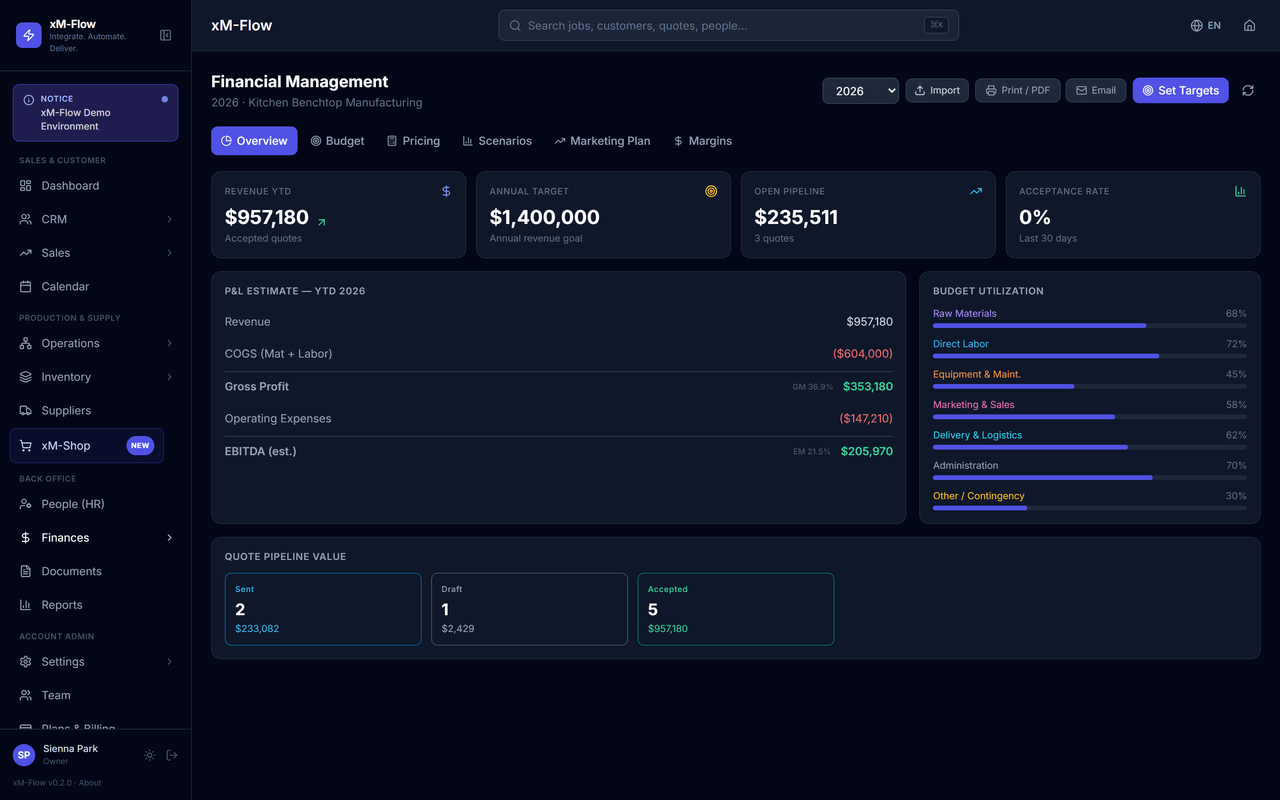
Stone, labour, machine time, freight and overhead land on the job as they happen. You see the margin at day three, not day thirty.
Finance and job P&L →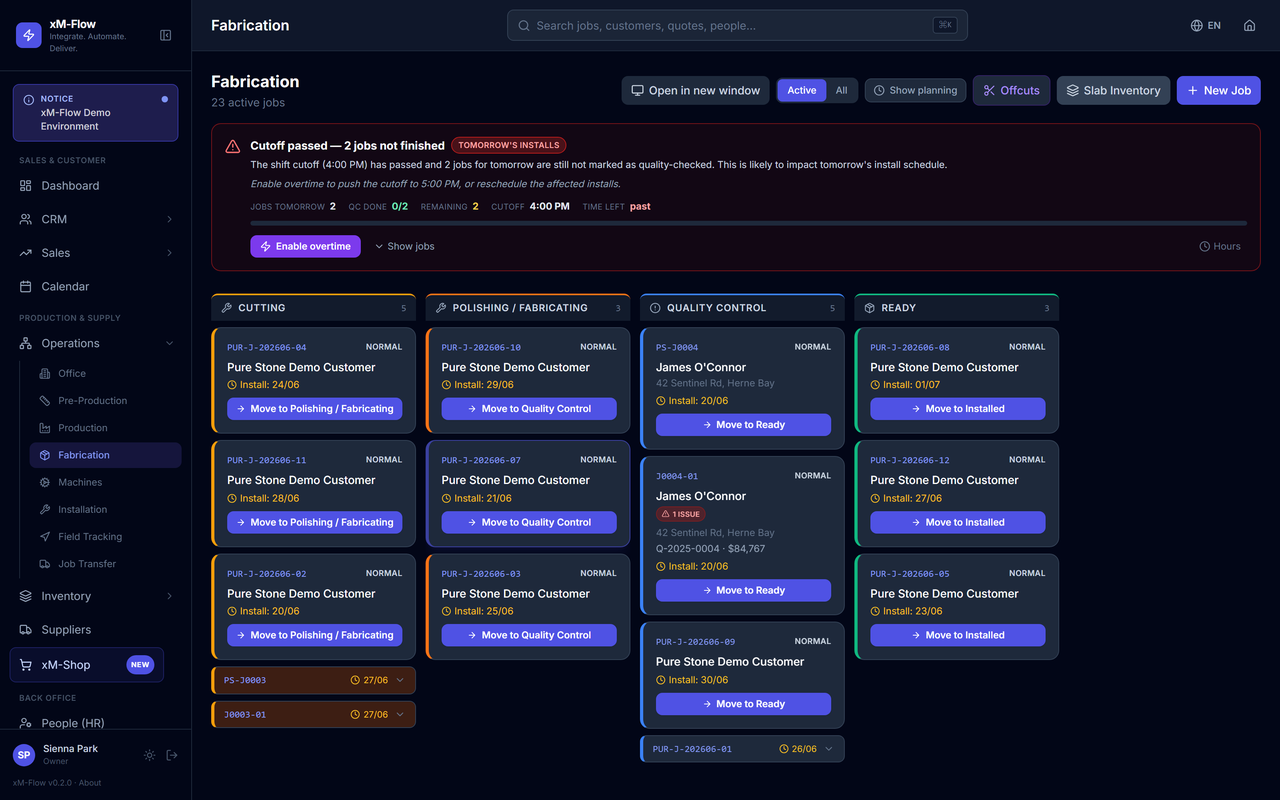
Spreadsheets, generic job software, or purpose-built?
There are three honest options, and each makes sense at a different size. The table is how they usually compare in a stone shop. It isn't about any one product.
| Spreadsheets + whiteboard | Generic job / field-service software | Purpose-built stone fabrication software | |
|---|---|---|---|
| Quote pricing | Manual, rates drift | Line items, no area or yield logic | Area, edges, cutouts and live rates |
| Slabs and offcuts | Walk the rack | Generic stock counts | Slab and offcut records, reserved to jobs |
| Shop floor | Whiteboard | Tasks and statuses | Stages, machines, operators, QC, remakes |
| Templating and install | Calendar and phone calls | Scheduling, usually good | Scheduling plus GPS check-in tied to the job |
| Job margin | Weeks later, if ever | Revenue minus invoiced costs | Live cost per job, as it happens |
| Re-typing per job | Several times | Fewer | Entered once |
If you run a handful of jobs a week with one crew, a well-kept spreadsheet can be enough. Once the floor and the installs run in parallel, re-typing alone costs more than software does, and the bigger loss is margin you only discover after you've quoted the next job the same way.
How xM-Flow does it
xM-Flow was built inside a working stone benchtop factory in New Zealand. It's one system with companion apps that all read and write the same job record. They aren't integrations bolted on later.
One record, entered once
Accepting a quote creates the job, its pieces, the slab reservation and the schedule in one move. Operators work phone-first at the machine. Nobody re-types the job, and nobody rings the office to ask where it is.
Quoting on the real stone
With xM-Draw you draw the benchtop in 3D while the customer watches, match veins across pieces and price it from live rates. xM-Slab photographs and straightens the real slab so the customer sees their top on the actual stone. That gets rid of the "that's not the stone I picked" remake.
Costing that follows the work
xM-Flow uses activity-based costing. Material, labour, machine time, freight and overhead are allocated to the job that caused them. Discounts route for approval before they hurt, and every machine carries its own profit and loss.
An AI agent that works inside the system
Alex, the built-in AI agent, opens jobs, drafts quotes, finds and reserves offcuts and flags risk on command, within each user's permissions. On Pro it also works as a business advisor, and it says plainly that its analysis is a suggestion.
Fits the tools you already use
xM-Flow connects to Xero and MYOB for accounting, Stripe for payments and WhatsApp for customer conversations, so you don't have to rip out what already works.
Checklist: choosing stone fabrication software
Whatever you shortlist, take one real job from last month and ask the vendor to run it end to end. Then check:
- Does it price by area, edges and cutouts from rates you control, or just accept a typed total?
- Can it reserve a specific slab to a job, and does it know what offcuts you already have?
- Does accepting a quote create the job, or does someone re-type it?
- Can operators use it at the machine on a phone, with gloves on, in a noisy shop?
- How does it handle a broken piece? A remake should check offcuts and cost the job, not vanish.
- When do you see job margin? During the job, or a month after the invoice?
- Does it talk to your accounting package (Xero, MYOB), or create a second set of books?
- Can you start with part of it and add modules as the team adapts?
- Who owns the data, and can you export it?
- Is it built for stone, or a general trade tool with a stone template?
Frequently asked questions
What is stone fabrication software?
A business system built for shops that cut and install natural and engineered stone benchtops and countertops. It manages the job from enquiry and quote through templating, slab allocation, cutting and polishing, installation and invoicing, so material, labour and machine costs land on each job and the shop can see its real margin.
How is it different from generic job management or ERP software?
Generic job software tracks tasks and invoices. Stone fabrication software also understands slabs, offcuts, area and yield, edge profiles, cutouts, templating and remakes, which is where a stone shop actually wins or loses money.
Does xM-Flow work for countertop shops as well as benchtop shops?
Yes. Benchtop and countertop are the same work under different names. xM-Flow is used for kitchen and bathroom tops in engineered stone, granite, marble, porcelain and other sintered surfaces. See countertop shop software.
Can it track slabs and offcuts?
Yes. Full slabs and reusable offcuts are tracked in inventory, can be reserved against a job, and are checked first when a piece breaks and needs a remake. See slab inventory.
Does it produce files for CNC machines?
xM-Draw exports a machine-ready DXF in millimetres for your CNC or CAM software, and estimates saw, CNC and cutout time so the machining cost shows up at the quote. See CNC and DXF.
Do I have to replace my accounting software?
No. xM-Flow connects to Xero and MYOB, so jobs, invoices and costs flow into the accounting system you already use.
How long does it take to get started?
Most shops set up their rates and run a real job in the first week. There's a 30-day free trial and no card is required. Plans are listed on the pricing section.